

How to Bulk Follow and Bulk Unfollow on X/Twitter
Complete guide to using TwitBot PRO, the Chrome extension for bulk follow,
bulk unfollow, user extraction, auto like, auto reply and auto repost on X/Twitter.
If you are looking for a practical way to bulk follow on X, bulk unfollow on Twitter,
or manage targeted users with a Twitter scraper extension, TwitBot PRO is one of the most useful tools to consider.
It is a Chrome extension that opens directly in your browser as a sidebar, allowing you to automate actions on X.com while keeping your feed visible.
Compared to old desktop-style solutions, the new version of TwitBot PRO is much more flexible.
You can extract users from followers, following lists, hashtags, or post commenters, move those users into an internal list,
and then start auto follow or auto unfollow campaigns with adjustable delays.
This makes it a powerful option for users who want to improve profile visibility and save time on repetitive tasks.
and combine these actions with likes, replies and reposts for a more complete X/Twitter engagement workflow.
What is TwitBot PRO?
TwitBot PRO is a Chrome extension for X/Twitter automation. It is designed for people who want to perform actions such as:
- Bulk follow on X/Twitter
- Bulk unfollow on X/Twitter
- Extract followers and following lists
- Scrape users by hashtag
- Extract commenters from a post
- Auto like recent posts
- Auto reply to posts
- Auto repost content
The extension works from a convenient sidebar interface, so you do not need a separate software window.
This makes the workflow faster and easier, especially for users who want to manage X/Twitter actions directly while browsing the platform.
Why use a bulk follow and bulk unfollow tool for X/Twitter?
Doing follow and unfollow actions manually on X/Twitter can take a lot of time. If you want to engage with users in a specific niche,
research competitors, or reach people who are already active around a certain hashtag, manual work quickly becomes inefficient.
A tool like TwitBot PRO helps by automating the repetitive part. You can first create a relevant target list and then process that list automatically.
This gives you more control over your outreach strategy and reduces the time spent opening individual profiles.
Another reason why many users look for a Twitter auto unfollow tool is account organization.
Following many accounts manually is easy, but managing and cleaning that list later is not. With TwitBot PRO, you can automate both sides of the workflow:
first follow targeted users, then unfollow them later when needed.
How to install TwitBot PRO Chrome extension
To start using this X/Twitter automation extension, install it from the Chrome Web Store.
The extension requires Google Chrome.

- Open the Chrome Web Store page
- Install X/TwitBot PRO
- Click the extension icon in Chrome
- The extension opens in a sidebar panel
- If necessary, it will load x.com automatically
- Log into your X/Twitter account and start using the automation features
The PRO version removes these usage limits.
How to extract users from X/Twitter before following them
One of the most useful features of TwitBot PRO is its built-in X/Twitter scraper. Before starting a bulk follow campaign,
you usually need a list of relevant users. The Extract tab lets you collect them in multiple ways.
Extraction options available
- Followers of a specific account
- Following of a target profile
- Users by hashtag
- Commenters on a post
This is especially useful if you want to target active users who are already interested in a topic related to your content.
For example, you can scrape users from a niche hashtag, export them, or move them to the internal User List for automation.
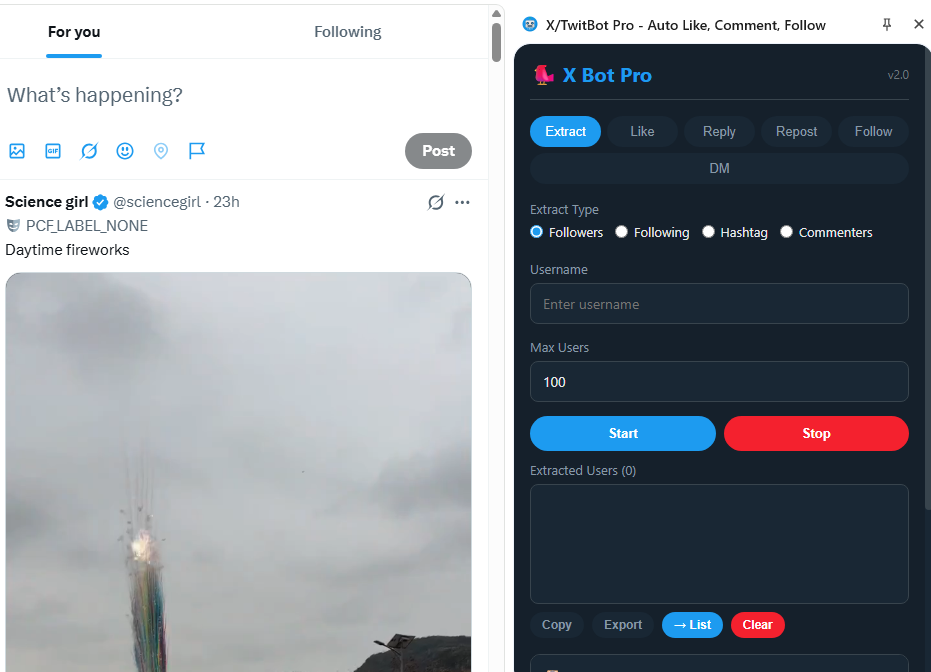
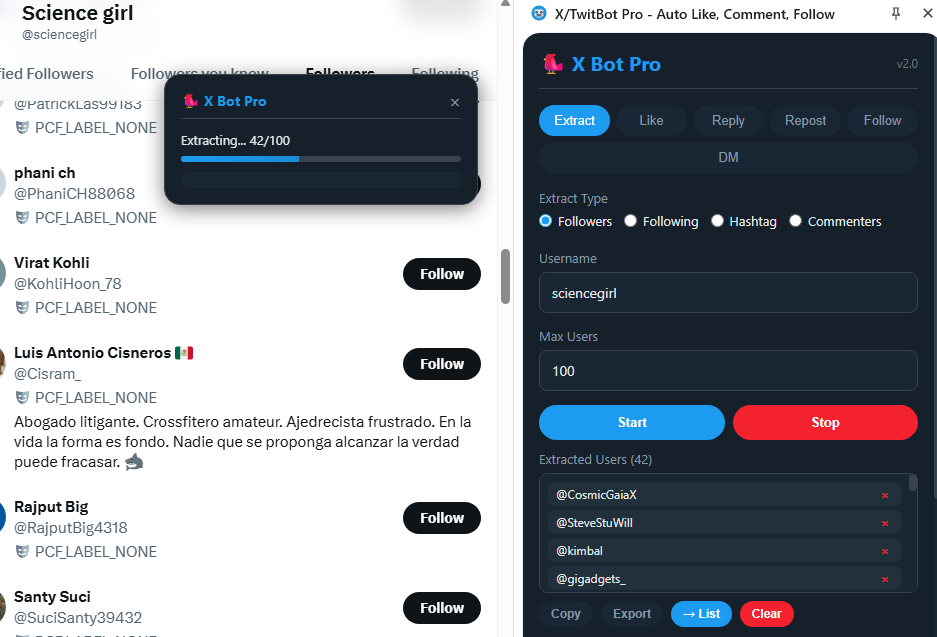
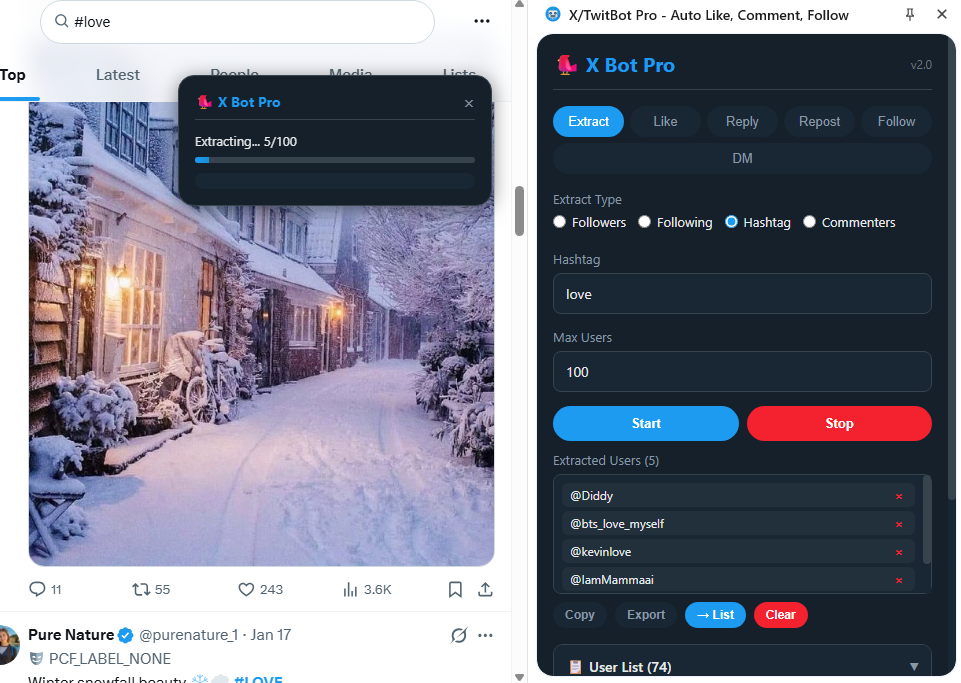
How to scrape users on X/Twitter
- Open the extension sidebar
- Go to the Extract tab
- Select Followers, Following, Hashtag, or Commenters
- Enter the target username, hashtag, or post URL
- Choose how many users to extract
- Click Start
Once the extraction ends, you can copy usernames, export them to TXT,
or move them directly into the internal User List that will be used for follow/unfollow automation.
How to bulk follow on X/Twitter with TwitBot PRO
After building your user list, you can start the bulk follow on X/Twitter operation.
This is the core feature for users searching for a Twitter auto follow extension.
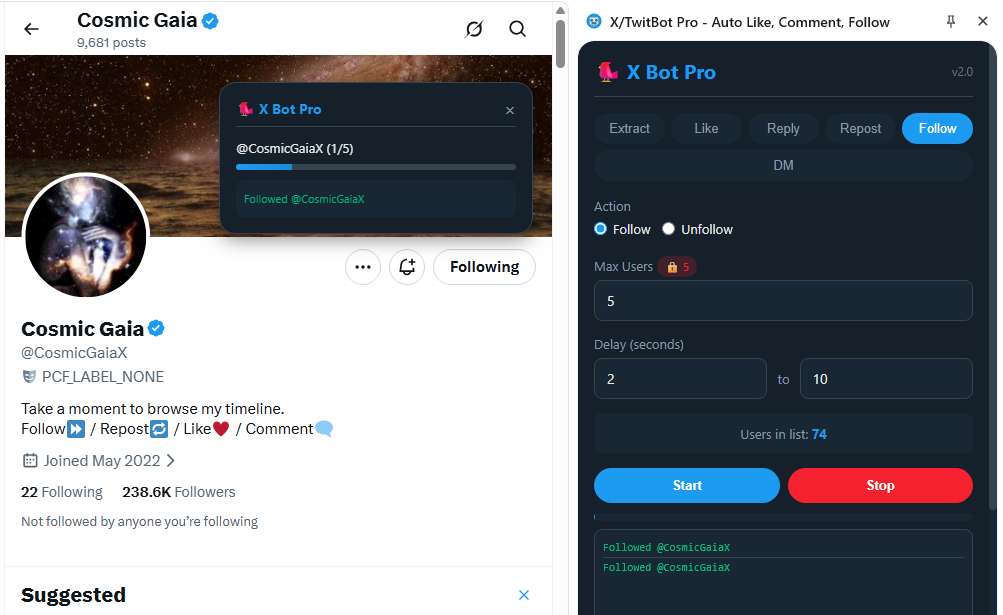
Step-by-step: bulk follow on X
- Make sure your User List contains the profiles you want to process
- Open the Follow tab
- Select the action Follow
- Set the maximum number of users
- Choose a random delay range between actions
- Click Start
The extension will open profiles one by one and automatically perform the follow action.
This is much more efficient than manual work and can be especially useful when you want to engage with targeted users from a niche audience.
is usually much better than following random users.
How to bulk unfollow on X/Twitter
If you are searching for a bulk unfollow tool for X or a Twitter auto unfollow extension,
TwitBot PRO includes this feature inside the same Follow tab.
The process is very similar to bulk follow, but in this case the selected action is Unfollow.
This is useful for keeping your account tidy, maintaining a better following/follower balance,
or removing accounts from a previously processed list.
Step-by-step: bulk unfollow on Twitter
- Open the Follow tab
- Select the action Unfollow
- Choose how many users to process
- Set a random delay range
- Click Start
The extension will visit the selected profiles and remove the follow automatically.
This makes it a practical choice for anyone looking for a bulk unfollow Chrome extension for X/Twitter.
Why follow and unfollow automation can save time
Many users use X/Twitter to connect with specific communities, grow awareness for a project, or increase the visibility of their content.
Doing this manually can become extremely repetitive. A tool like TwitBot PRO reduces friction by automating the most repetitive actions.
For example, you can scrape users interested in a hashtag, follow them with a moderate delay, and later unfollow accounts you no longer want in your following list.
In this sense, TwitBot PRO acts both as a Twitter scraper and a bulk follow/unfollow tool.
Other X/Twitter automation features included
In addition to follow and unfollow actions, TwitBot PRO includes other tools that can help diversify account activity.
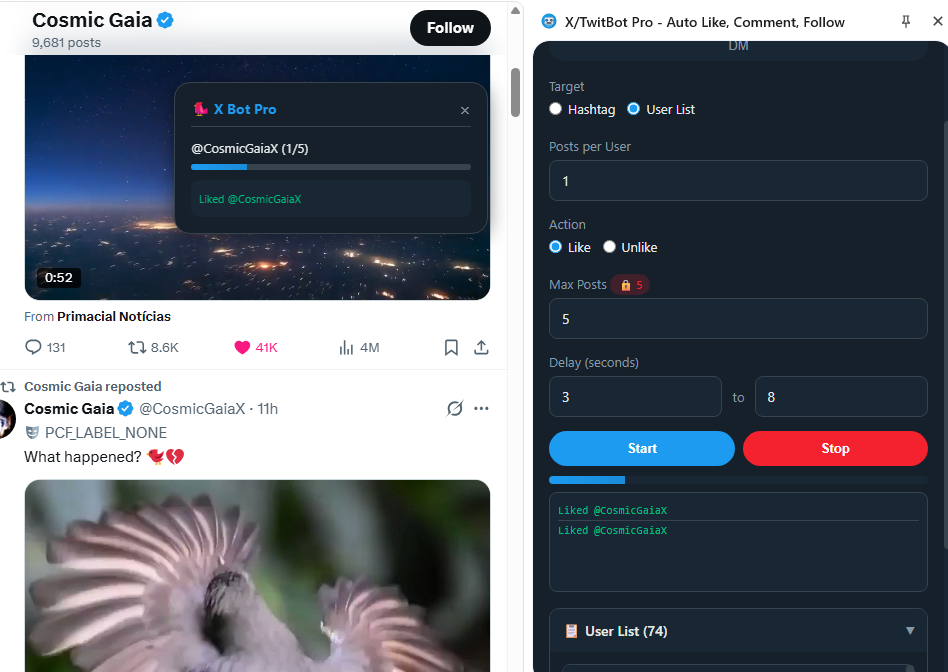
Auto Like on X/Twitter
The Like tab lets you automatically like recent posts from selected users or by hashtag.
This can help make your account more visible to people already active in your niche.
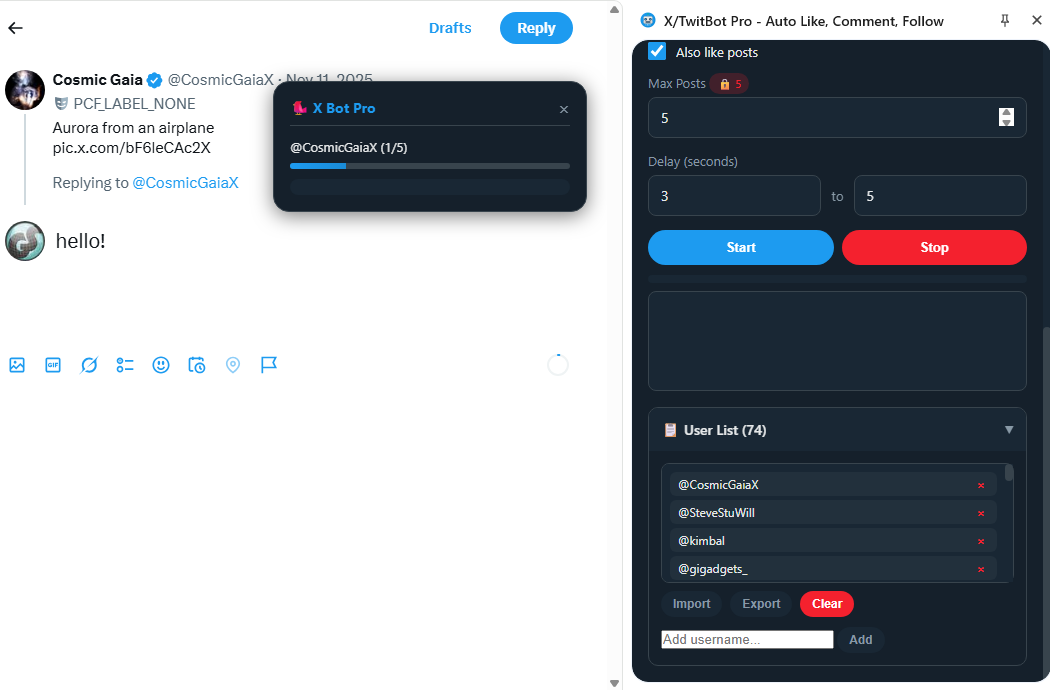
Auto Reply on X/Twitter
The Reply tab lets you automatically respond to posts using preset messages.
You can also import multiple replies from a TXT file and let the extension choose a message randomly.
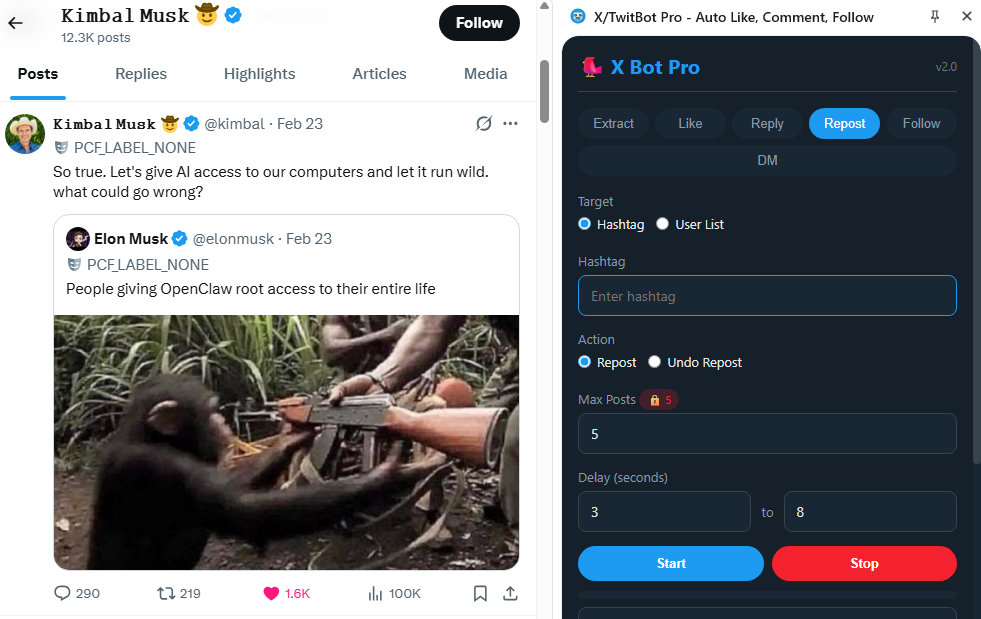
Auto Repost on X/Twitter
The Repost tab allows automatic reposting from selected users or hashtag-based results,
helping keep your profile active around relevant content.
Free vs PRO version
The free version of TwitBot PRO is fully functional but limited to 5 actions per task.
This limitation applies to tasks such as follow, unfollow, like, reply, repost and extraction.
| Feature | Free | PRO |
|---|---|---|
| User extraction | Yes | Yes |
| Bulk follow / bulk unfollow | Yes | Yes |
| Auto like / reply / repost | Yes | Yes |
| Task limits | 5 actions per task | Unlimited |

How to unlock the PRO version
- Open the extension
- Click on any ???? 5 badge shown near the limits
- Enter your license code
- Click Send
After activation, the limits are removed and you can use the extension without the 5-action cap.
Safe usage tips for X/Twitter automation
Although TwitBot PRO automates actions that can also be done manually, it is still important to use moderation.
Excessive activity may trigger temporary restrictions on X/Twitter.
Choose realistic delays, avoid repetitive replies, and never run aggressive campaigns for too long.
- Use random delays, ideally between 10 and 30 seconds
- Start with small tasks and increase gradually
- Do not leave automation running for too many hours continuously
- Avoid spam-style comments or suspicious links in replies
- Prefer niche-targeted user lists instead of generic random lists
Suggested limits
| Action | Suggested hourly limit | Suggested daily limit |
|---|---|---|
| Like | 50/60 per hour | 800/1000 per day |
| Reply | 20 per hour | 200 per day |
| Follow | 60/80 per hour | 800 per day |
| Unfollow | 60/80 per hour | 800 per day |
| Repost | 50 per hour | 500 per day |
Conclusion
For anyone searching for a bulk follow on X tool, bulk unfollow on Twitter extension,
or an X/Twitter scraper with automation features, TwitBot PRO offers a complete workflow inside Chrome.
You can extract users, organize them into a list, follow them in bulk, unfollow them later, and combine the process with likes, replies and reposts.
Used with moderation and realistic delays, it can save a lot of time and make your X/Twitter account management much more efficient.